


Implementation of a REcommerce process in a technology company
90T CO2e saved for the environment
"The seamless integration of the Kuptam.pl platform allowed our team to easily navigate and use the platform without the need for extensive training."

Santander Bank Polska SA – a universal bank with its registered office in Warsaw. The third bank in Poland in terms of the value of assets and the third in terms of the number of branches. Since 2011, it has been part of the Spanish Santander Group.

SANTANDER Bank’s main challenge was to develop an effective internal sales channel for depreciated electronic equipment. It was necessary to create a process that not only ensured the efficient sale of used equipment, but also provided the bank’s employees with a convenient and easy way to acquire fully valuable items at low prices. In addition, it was necessary to ensure that the entire process was clear and easy to use to encourage users to actively participate.
Santander Bank has decided to introduce an integrated internal sales process on the Silentclicks.com platform. This process involves several stages – from loading data into the auction system, through pre-emption for employees, to public auctions for other users. The advanced sales process integrated with Santander Bank’s Active Directory and Remedy systems made it possible to automate many processes, such as generating offers or reporting results, which made the entire process much easier to manage.
The figure below presents a generalized diagram of the agreed business process aimed at the Bank’s internal sales.
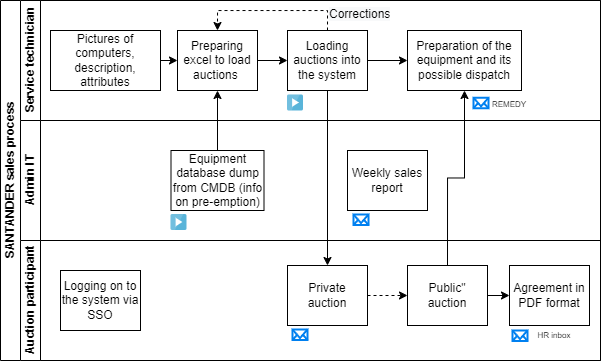
A generalized process consists of, m.in, the following elements.
Loading Hardware Data:
Pre-emption:
“Public” sale:
Preparing Your Computer:
Reporting:

The implementation of the internal sales process has brought a number of benefits to Bank Santander.
The bank’s internal sales process is also in line with the idea of sustainable development – it allows for extending the life cycle of electronic equipment, which reduces the generation of waste and reduces the impact on the natural environment. The Bank’s profit from the sale is donated to charity.

10,000+
system users
2x
reduced handling time
of the sales process
5
months of preparation
for implementation

We were persuaded to cooperate by INNOKREA's high engineering competence and many years of experience in the development and implementation of IT solutions. The INNOKREA team showed great commitment and the skills needed to complete the project. We recommend INNOKREA for demanding IT projects where time, problem-solving skills and the experience of a competent engineering team count.
Michał Behan
Head of IT Operations, Santander Bank Polska
We will show you how custom software can reduce costs, support ESG reporting and unlock new business opportunities.
Free consultation